Know exactly which bikes need work before someone rides one.
Post-it notes and memory don't scale. Valet tracks maintenance automatically based on how your fleet is actually used — and alerts your team when bikes are due.
Go ahead. Tell us what frustrates you about your booking software.
Got it. A real person will read this today.
Want to see how Valet handles things differently?
Ready to switch? Start free · Book a demo
The problem with most rental shops
Missed maintenance is a liability you can't see until it's too late.
When your fleet grows past a handful of bikes, keeping track of what's been serviced — and what hasn't — becomes a full-time job. Seasonal staff don't know the bikes. Whiteboards get erased. Spreadsheets go stale. Valet replaces all of it with automated tracking that works whether you're in the shop or not.
Scheduling
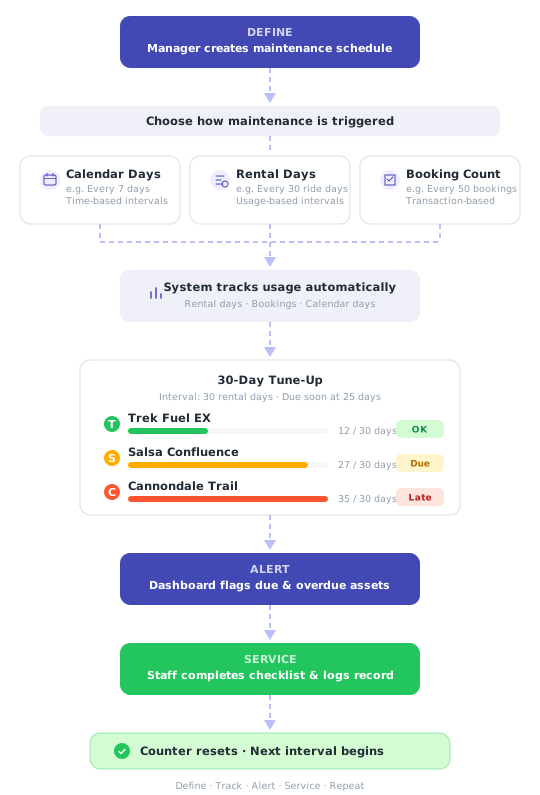
Three ways to trigger maintenance — pick what fits your operation.
Not every bike wears the same way. A beach cruiser rented daily needs attention more often than a mountain bike rented on weekends. Valet lets you schedule maintenance by calendar time, actual rental days, or completed bookings — so service intervals match real-world usage.
- Choose between calendar, rental-day, or booking-based intervals
- Set due-soon thresholds for early warnings
- Assign schedules to asset types — individual bikes inherit automatically
- Activate or pause schedules without deleting them
Dashboard
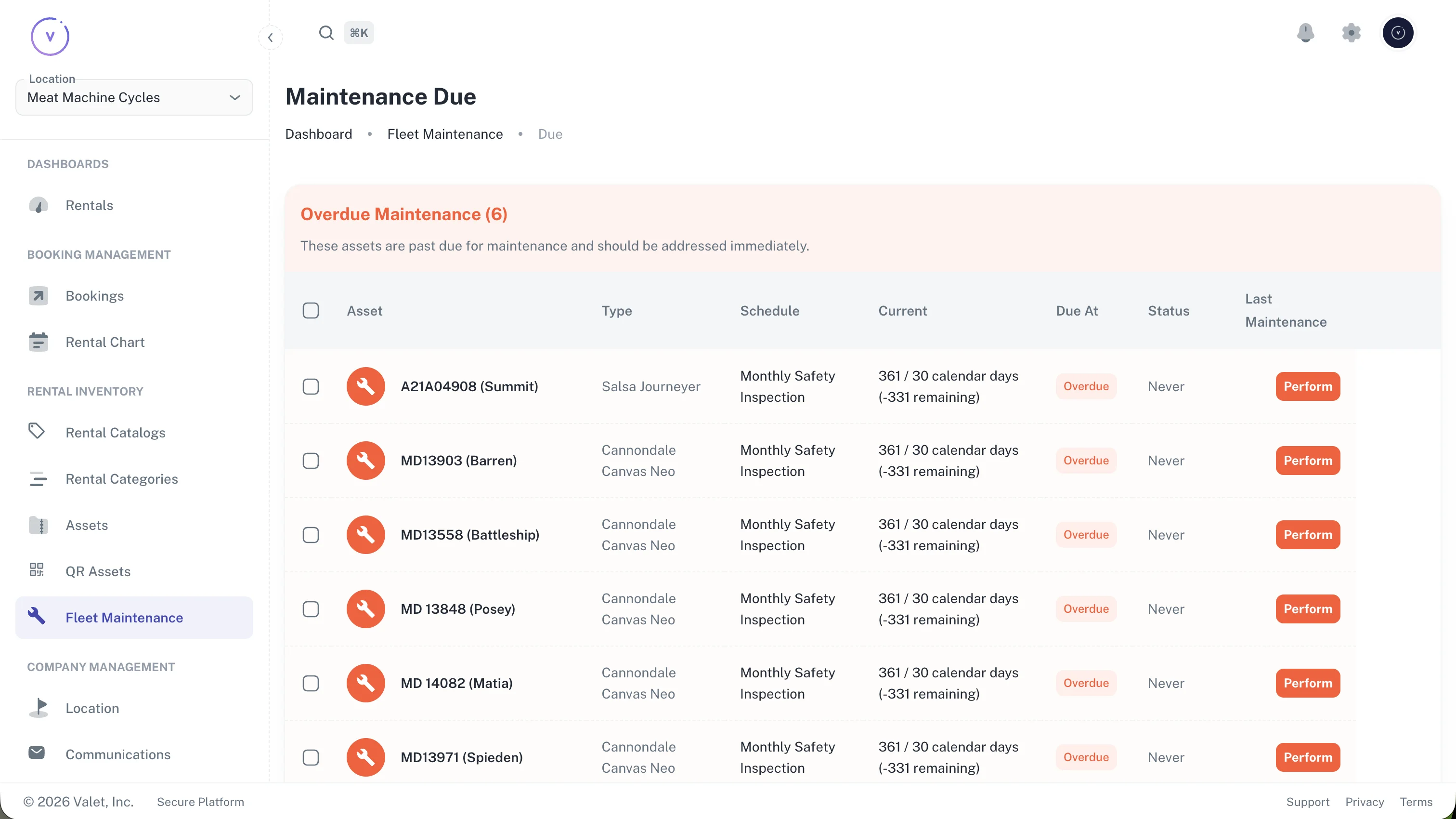
Open the app. Know what needs attention. Done.
The maintenance dashboard gives you a real-time view of your fleet's service status. Overdue assets are flagged red. Due-soon assets show yellow. Everything else is green. No digging through records — just open the page and you know what to do today.
- See overdue and due-soon assets at a glance
- Four KPI cards: overdue, due soon, completed this month, active schedules
- Filter by schedule type or asset category
- Works on desktop and mobile — check status from anywhere
QR Scanning
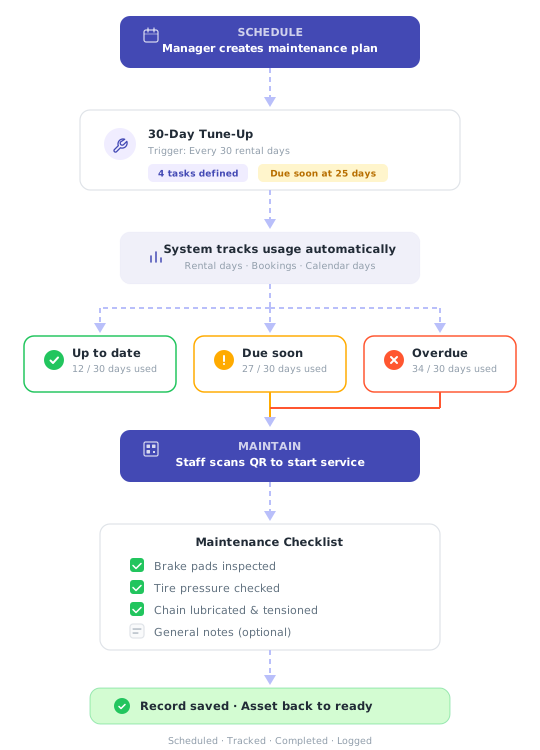
Scan a QR code. Start the checklist. Log the work.
Every bike in your fleet gets a QR code. When it's time for maintenance, your mechanic scans the code with their phone — no app download needed. The system identifies the bike, shows its service history, and opens the right checklist. Three taps and the record is saved.
- Scan to pull up any bike's full maintenance history
- System auto-selects the right checklist for that asset type
- Works on any phone camera — no special hardware
- New staff can run it on day one, no training needed
Checklists
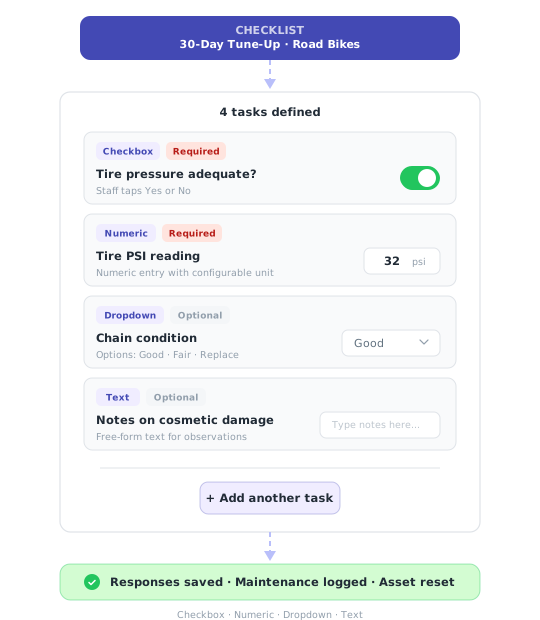
Build checklists that match how your shop actually works.
Every shop has its own standards. Valet's checklist builder lets you define exactly what gets checked, how it's recorded, and whether it's required. Four task types cover everything from a quick yes/no to detailed measurements with units.
- Checkbox, numeric, dropdown, and text input types
- Mark tasks as required or optional
- Different checklists per asset type — road bikes vs. e-bikes vs. kids' bikes
- Staff complete tasks on their phone at the workbench
History & Reports
A permanent record for every bike you've ever serviced.
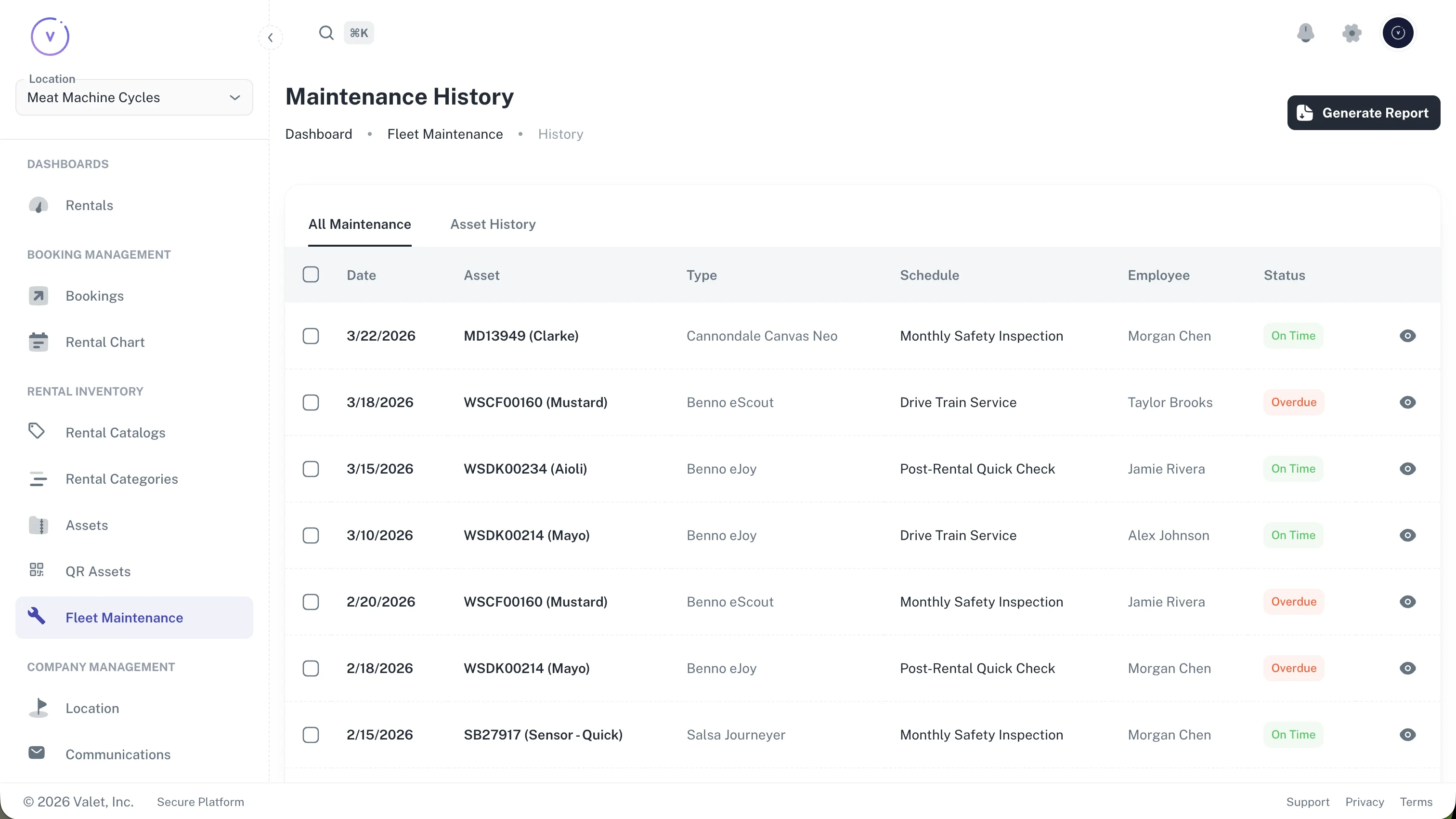
Every maintenance event is logged with the employee name, timestamp, task responses, and whether it was completed on time. Need to prove a bike was serviced before an incident? Pull the report. Want to see which bikes are chronically late? Filter by overdue status.
- Complete audit trail: who, what, when, and what they found
- Overdue flag tracks late completions for accountability
- Export PDF reports by date range or individual asset
- Filter history by asset, schedule, or employee
See fleet maintenance in action.
We'll walk you through scheduling, QR scanning, checklists, and reports — using your actual fleet as the example.
Book a demoMulti-Location
One schedule, multiple shops. Each team sees their own work.
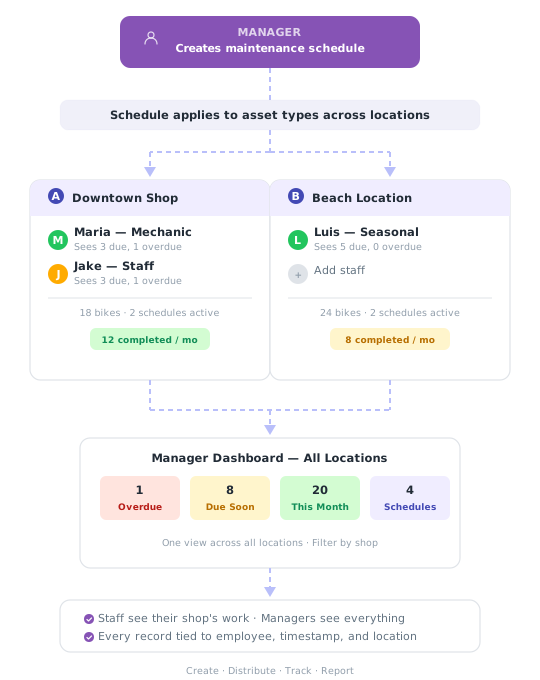
Running more than one location? Create a maintenance schedule once and it applies to the right asset types everywhere. Staff at each shop see only their location's due assets. Managers get a single dashboard across all locations — with KPIs, overdue counts, and completion rates rolled up.
- Enable maintenance per location — roll out when you're ready
- Each location gets its own asset pool and work queue
- Staff see only their shop's bikes — no cross-location confusion
- Every record tied to employee, timestamp, and location
Valet has been instrumental in getting our rental operation running smoothly. The service has been fantastic.
Frequently asked questions
Valet supports three interval types: calendar days (e.g. every 7 days), rental days (based on actual usage), and booking count (after a set number of completed rentals). You can mix and match across different schedules, and each schedule can target specific asset types.
QR codes make maintenance faster — scan to pull up the asset's history and start a checklist instantly — but they're not required. You can also search for assets manually in the maintenance dashboard.
Yes. Each maintenance schedule targets specific asset types. A road bike tune-up checklist can differ completely from an e-bike battery check. You define the tasks, input types, and requirements for each.
Every maintenance record is flagged as on-time or overdue. The dashboard shows overdue counts at a glance, and PDF reports include compliance rates across your fleet.
Yes. Valet generates PDF maintenance reports filterable by date range, asset, or schedule. Reports include summary metrics, individual task responses, and on-time/overdue status for each record.
No. Fleet maintenance is included in every Valet account at no additional cost. You pay 5% per completed booking — maintenance tracking, QR codes, and reporting are all included.
Start tracking maintenance today.
Set up in minutes. No credit card required. See how it fits your operation.
5% per completed booking · No setup fees · No contracts